The server-side JavaScript world in 2026 is comfortable with having more than one good option. Node.js has been the reliable workhorse for over a decade: stable, heavily tested, and predictable. Bun changed the conversation around backend performance and developer experience. If you are tired of waiting 45 seconds for a clean install, or fighting cold start latency in your serverless functions, you are probably weighing a migration. So let me break down what using Bun in production actually looks like right now: the benchmarks, the compatibility with the npm ecosystem, and the gotchas you only find once real traffic hits your servers.
What makes Bun different from Node.js under the hood?
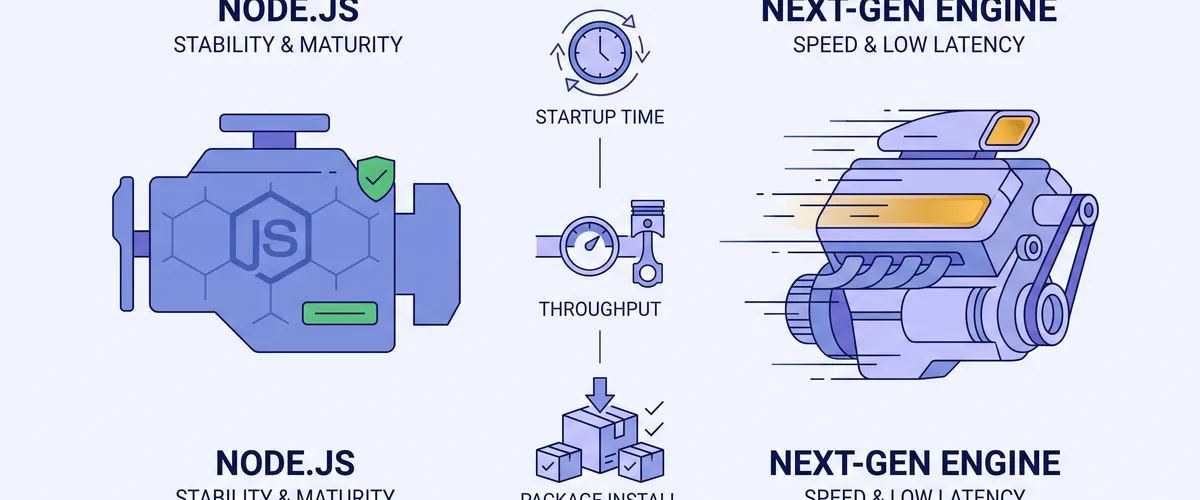
The performance differences between Bun and Node.js come straight from their architectures and the languages they are built in. Node.js is written in C++ on top of Google’s V8 engine, the same engine that powers Chrome. V8 is heavily optimized for long-running processes, and its mature Just-In-Time compiler is good at settling computational workloads into fast code over time.
Bun took a different path. It is written in Rust and uses Apple’s JavaScriptCore engine, the same one behind Safari. (Bun’s core was originally written in Zig and was rewritten in Rust during 2026, largely for memory safety and a bigger pool of contributors.) JavaScriptCore was designed for fast startup and low baseline memory. Rust gives Bun low-level control over system calls and memory with no garbage collector, and its safety guarantees remove a class of bugs that a lower-level language makes easy to hit. Together that trims the overhead standard library abstractions add to file reads and network I/O.
There is also a philosophy difference. Node.js is modular: it gives you the runtime, and you bring your own tooling for package management, testing, and transpilation. Bun is all-in-one. It replaces those separate tools with optimized, built-in equivalents, and it even ships native database clients like Bun.sql and Bun.redis out of the box.
How do the performance benchmarks actually stack up?
Benchmarks in 2026 show clear lines between where Bun pulls ahead and where Node.js holds its own.
Startup time and serverless cold starts
Cold start latency matters most in serverless and CLI tools. Serverless providers bill by execution duration, so faster startup translates directly into lower cost.
Node.js 22 usually needs 40ms to 120ms to bootstrap, depending heavily on the size of the dependency tree. When it has to transpile complex TypeScript first, cold starts can push past 250ms.
Bun bootstraps in roughly 8ms to 15ms. Because it runs TypeScript natively with no separate compile step, it can process realistic application code in around 18ms. In one real AWS Lambda migration on a high-traffic function, the team watched their average cold start fall from 940ms on Node.js to 290ms on Bun. That 69% latency drop cut their compute bill by about 35%.
HTTP throughput and request handling
In synthetic benchmarks, Bun’s native HTTP server clearly outperforms the standard Node.js module. Request parsing and response serialization happen in native Rust before any JavaScript runs.
| Framework & Runtime | Requests per Second | Average Latency | Memory (RSS) |
|---|---|---|---|
| Bun.serve (Bun native) | ~52,400 req/sec | 1.9ms | 38 MB |
| Hono (Bun 1.2) | ~48,100 req/sec | 2.1ms | 42 MB |
| Fastify 5 (Node.js 22) | ~22,800 req/sec | 4.4ms | 64 MB |
| Express 5 (Node.js 22) | ~11,200 req/sec | 8.9ms | 71 MB |
That data reflects a JSON API returning a 200-byte response on an 8 vCPU ARM64 instance. The picture changes once you add realistic database queries and authentication middleware: the throughput gap narrows to a 20% to 30% advantage for Bun in production-grade apps. In other words, once real work is involved, database I/O becomes the bottleneck rather than runtime execution.
Here is what the native server looks like. No framework, no dependencies:
const server = Bun.serve({ port: 3000, fetch(req) { const url = new URL(req.url); if (url.pathname === '/health') { return new Response('ok'); } return Response.json({message: 'Hello from Bun'}); },});
console.log(`Listening on http://localhost:${server.port}`);Under the hood, the request never touches JavaScript until it has already been parsed:
Is the npm ecosystem actually compatible?
As of 2026, Bun claims roughly 98% compatibility with the Node.js API and the wider npm ecosystem. Standard frameworks like Next.js, Express, Fastify, and NestJS run out of the box.
That last 2% is where enterprise migrations get stuck, though. The gaps sit mostly in specialized core modules and native addons:
- Native C++ addons. Packages that compile C++ bindings for Node.js through
node-gypoften fail or need a pure-JavaScript fallback. Older versions ofbcryptandsharp, and some database drivers, land here. - Specific core APIs.
node:fsandnode:httpare fully implemented, but edge-case APIs innode:worker_threadsandnode:inspectorstill have known gaps. - Package manager overrides. Bun still struggles with the complex nested dependency overrides that Yarn Berry and pnpm handle cleanly.
To keep dependency trees small, Bun bakes common backend needs into the runtime. Native clients for PostgreSQL, SQLite, S3, and Redis let you drop dozens of third-party packages. A Postgres query looks like this, with no pg install:
import {sql} from 'bun';
const users = await sql` SELECT id, email FROM users WHERE active = ${true} LIMIT 10`;
console.log(users);Careful here
Before you rely on native clients, check that they cover the features you use (connection pooling behavior, prepared statements, listen/notify). “There is a built-in client” is not the same as “it does everything the mature driver does.”
Package installation speed
Package installation is where Bun’s advantage is hardest to argue with. Using hard links and optimized system calls, its package manager reshapes CI pipelines. For a heavy monorepo with over 2,300 dependencies, a cold install shows the gap plainly:
- npm: ~89.4 seconds
- pnpm: ~21.7 seconds
- Bun: ~4.1 seconds
Bun also moved from a binary lockfile to a text-based bun.lock, which fixed a real developer-experience problem: teams can now review dependency changes cleanly in pull requests instead of staring at an opaque blob.
Tip
You can adopt Bun purely for CI/CD package installation while keeping Node.js
as the production runtime. Swapping npm ci for bun install can cut minutes
off deployment pipelines with essentially zero runtime compatibility risk. It
is the lowest-risk way to try Bun.
Can Bun replace your bundler and test runner?
The Node.js ecosystem often pushes you into juggling config files for Webpack, Babel, Jest, and TypeScript. Bun collapses that toolchain into one binary.
As a test runner, bun test is highly compatible with the Jest API: snapshots, mocking, and DOM APIs all work. Because the runner is embedded in the runtime, it is fast. A simple suite that takes Jest 1.2 seconds runs in about 0.08 seconds under Bun.
import {add} from './math';import {test, expect} from 'bun:test';
test('adds two numbers together', () => { const result = add(2, 3); expect(result).toBe(5);});Whether you migrate your test suite depends on the project. For pure backend TypeScript or Bun-native projects, bun test gives you the fastest feedback loop available. For Vite, React, or complex frontend monorepos, Vitest is still the better fit because it plugs directly into the Vite module graph for hot module replacement.
What does this mean for Docker image sizes and cold starts?
Smaller containers pull faster and start faster. Standard Node.js images often sit around 180MB to 200MB, while the oven/bun:alpine and oven/bun:slim images typically land between 65MB and 89MB.
A repository set up for a clean multi-stage build looks like this:
Directorymy-bun-service/
Directorysrc/
- index.ts
- Dockerfile
- package.json
- bun.lock
- tsconfig.json
The multi-stage build keeps development dependencies and build tools out of the final image:
# Build stageFROM oven/bun:1.3-alpine AS buildWORKDIR /appCOPY package.json bun.lock ./RUN bun install --frozen-lockfile --ignore-scriptsCOPY . .RUN bun run build
# Production stageFROM oven/bun:1.3-alpine AS productionWORKDIR /appENV NODE_ENV=productionCOPY package.json bun.lock ./RUN bun install --frozen-lockfile --productionCOPY --from=build /app/dist ./distEXPOSE 3000CMD ["bun", "run", "./dist/index.js"]Bun also has a --compile flag that bundles your whole application and the runtime into a single standalone executable:
bun build ./src/index.ts --compile --outfile myapp./myapp # no runtime install needed on the target machineThat removes the need to install any runtime on the target machine, which is a genuine win for distributing CLI tools.
What are the real-world migration considerations and risks?
Benchmarks show the upside. Running Bun in production shows the risks, and they cluster around garbage collection and memory.
The root of it is the difference between V8 and JavaScriptCore. V8 has spent over fifteen years tuning garbage collection for long-lived, highly concurrent server processes. JavaScriptCore was built for the lifecycle of a single web page in Safari. In high-concurrency workloads, like a Next.js server-side rendering app or an API holding thousands of long-poll WebSockets, Bun has shown unbounded memory growth.
Observability is the other rough edge. Many APM and telemetry libraries rely on V8-specific hooks to read heap size and event loop handles. Under Bun, those metrics can report zero or return misleading values mapped from Linux system stats, so you can end up flying blind exactly when you need visibility most.
The practical takeaway: profile before you commit. Unsettled HTTP promises and unoptimized closures can exhaust memory under Bun in cases that Node.js quietly forgave.
Careful here
Do not treat a passing test suite as proof that a long-lived service is safe on Bun. Load-test it for hours, watch RSS over time, and confirm your monitoring reports real numbers before you move production traffic.
When does it make sense to migrate vs. stick with Node.js?
The decision comes down to your project’s requirements and your tolerance for edge cases.
Reach for Bun when you are:
- Building serverless. A 60% to 70% cut in cold starts improves user experience and lowers compute cost at the same time.
- Developing CLI tools. Native TypeScript execution and single-file executables make distribution much simpler.
- Starting greenfield projects. New APIs on frameworks like ElysiaJS get high throughput without dragging along legacy Node.js configuration.
- Optimizing CI/CD. Using
bun installpurely as a package manager is low-risk and high-reward for any codebase.
Stick with Node.js when you are:
- Running mission-critical legacy systems. Heavy reliance on native C++ addons, deep V8 internals, or tangled Webpack setups means the migration friction outweighs the gains.
- Running long-lived, high-concurrency services. For complex SSR apps or large WebSocket brokers that run for weeks, V8’s mature garbage collector and deep monitoring integrations are worth a lot.
- Working under strict compliance. Node.js runs under the OpenJS Foundation with clear long-term support policies, which matters in regulated industries.
Neither runtime is going to make the other obsolete. Node.js keeps adopting modern features, and Bun keeps stabilizing its memory management and edge-case compatibility. Picking one is a matter of matching the tool to the workload, not backing a winner.
Frequently Asked Questions
For the right workloads, yes. Serverless functions, CLI tools, greenfield APIs, and CI package installation are all solid places to run Bun today. The caution is around long-lived, high-concurrency services, where JavaScriptCore’s garbage collection and weaker observability integrations mean you should load-test and profile before moving production traffic.
Yes, and it is the lowest-risk way to adopt Bun. Replacing npm ci with bun install in CI can save minutes per pipeline while your application still runs
on Node.js at runtime. Because you are only using the package manager, there
is essentially no runtime compatibility risk.
JavaScriptCore starts with a low memory baseline, which is great for cold starts. But its garbage collector was tuned for a browser tab, not a server process running for weeks. Under sustained high concurrency, Bun has shown memory growing without settling, so the same trait that helps startup can hurt a long-lived service.
Yes. Bun executes TypeScript and JSX directly, with no separate transpilation
step. That is a big part of why its cold starts are so fast, and why bun test and bun run feel instant compared with running ts-node on Node.js.
Native C++ addons compiled with node-gyp (older bcrypt, sharp, some
database drivers), a few edge-case node:worker_threads and node:inspector
APIs, complex nested dependency overrides, and observability tooling that
expects V8-specific hooks. Standard frameworks like Express, Fastify, NestJS,
and Next.js generally run without changes.
References
- Bun documentation
- Bun.serve HTTP server reference
- Bun SQL (native database client)
bun testrunner- Single-file executables with
bun build --compile - oven/bun Docker images
- Node.js documentation
- V8 JavaScript engine
- JavaScriptCore (WebKit)
- The Rust programming language
- Bun’s rewrite from Zig to Rust (PR #30412)